
USBLiter8 A12/A13 Tool Download 2026
Purple Mode, Magic CFG, USB Serial and Erase Device support for compatible Apple A12 and A13 devices using an RP2350 board.

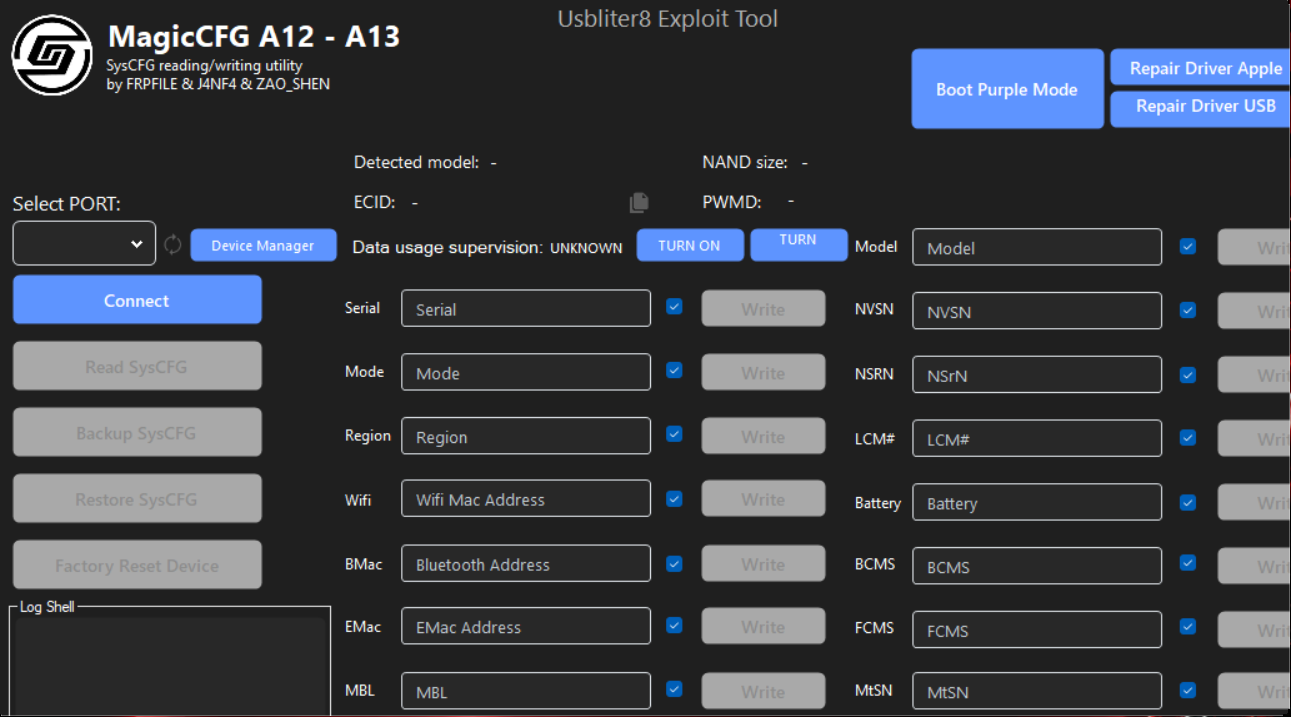
USBLiter8 A12/A13 Tool is a Windows technical-support utility for compatible iPhone and iPad models. It works with USBLiter8 Pwn DFU hardware to provide Purple Mode, Magic CFG, USB Serial and device-erasing functions for professional repair workflows.
An RP2350 development board is required. The Waveshare RP2350 USB-A is recommended because its built-in USB host port allows a Lightning cable to connect directly without cutting or soldering the cable.
Authorized use only: Continue only if you are the lawful device owner or have clear authorization from the lawful owner. Using servicing software on stolen, lost or unauthorized devices is prohibited and may lead to legal consequences.
What Can USBLiter8 Tool Do?
Places a compatible device into the required diagnostic state for supported configuration and servicing operations.
Provides supported SysCFG read and write functions for trained technicians working on authorized devices.
Enables the supported USB serial workflow used by compatible repair and configuration procedures.
Erases a compatible device when the operation is supported, including authorized servicing of certain disabled or previously processed devices.
Data warning: The Erase Device function permanently deletes user data. Confirm the exact device, create a backup whenever possible and never disconnect the device while an operation is running.
Supported iPhone and iPad Models
The tool package lists support for the following Apple A12 and A13 models:
Prepare Your RP2350 Board First
Before opening the Windows tool, flash the correct UF2 firmware and verify the board, Lightning cable and USB connections.
🔧 Open RP2350 Firmware Setup GuideWhat You Need
- A supported Apple A12 or A13 iPhone or iPad.
- A Windows computer with working USB ports.
- A flashed RP2350 board; Waveshare RP2350 USB-A is recommended.
- A reliable Lightning data cable.
- The latest USBLiter8 A12/A13 Tool package.
- The device ECID for registration when requested by the tool.
How to Use USBLiter8 A12/A13 Tool
- Prepare the hardware: Flash the correct UF2 firmware to the RP2350 board and check all connections.
- Enter DFU Mode: Connect the authorized device to the computer and place it into genuine DFU Mode.
- Register the ECID: Open USBLiter8 Tool, copy the ECID displayed by the software and complete the required device registration.
- Connect the RP2350: Follow the tool prompt and connect the device through the Waveshare RP2350 USB-A board.
- Select the required function: Use only the supported Purple Mode, Magic CFG, USB Serial or Erase Device operation required for the authorized repair.
- Wait for completion: Do not disconnect the board, cable or device until the software confirms that the operation has finished.
Important: Available functions can depend on the exact device model, board firmware and tool release. If an option is not displayed for your device, do not force another model or operation.
USBLiter8 Tool Download
Download USBLiter8 Exploit Tool – Magic CFG
Click the button to open the USBLiter8 Windows package on MEGA. Select the latest tool package and press Download.
Scan downloaded files with updated security software before opening them.
Troubleshooting
The tool does not detect the device
- Confirm that the device is genuinely in DFU Mode.
- Try a different USB port and a known-good data cable.
- Reconnect the device and restart USBLiter8 Tool.
The RP2350 operation fails
- Verify that the correct UF2 firmware is installed for the exact board.
- Reconnect the board and device in the recommended order.
- Use the Waveshare RP2350 USB-A board if cable or breakout-board problems continue.
ECID registration is not accepted
- Copy the ECID directly from the tool without adding spaces.
- Confirm that the registered ECID belongs to the connected device.
- Contact the tool registration provider if the same ECID remains unavailable.
Frequently Asked Questions
Does USBLiter8 Tool work without an RP2350 board?
No. An RP2350-based board is required for the USBLiter8 Pwn DFU hardware stage.
Which RP2350 board is recommended?
Waveshare RP2350 USB-A is recommended because it includes a USB host port and avoids manual Lightning-cable wiring.
Which devices are supported?
The published tool list covers the Apple A12 and A13 iPhone and iPad models shown in the Supported Models section above.
Does Erase Device delete personal data?
Yes. Erasing permanently removes device data, so verify authorization and back up recoverable information before continuing.
Compatibility note: Support may change as the software, device firmware and RP2350 builds are updated. Always check the exact model and use the correct files before starting.
Last updated: August 5, 2026
No comments:
Note: Only a member of this blog may post a comment.